
Finance & Document Ops6 min readUpdated: September 2026

How to Convert PDF Tables to Excel While Preserving Column Layout

A PDF file may render an aligned financial table on screen while containing no native row-and-column data structure beneath. Converting invoices, statements, or balance sheets into Excel requires reconstructing geometric coordinates followed by an audit.

Fundamental Factual Rule: Output fidelity depends entirely on PDF construction

No software engine can guarantee 100% error-free conversion across all files. Merged cells or scanned bitmaps demand human auditing of column alignments, decimals, and totals.
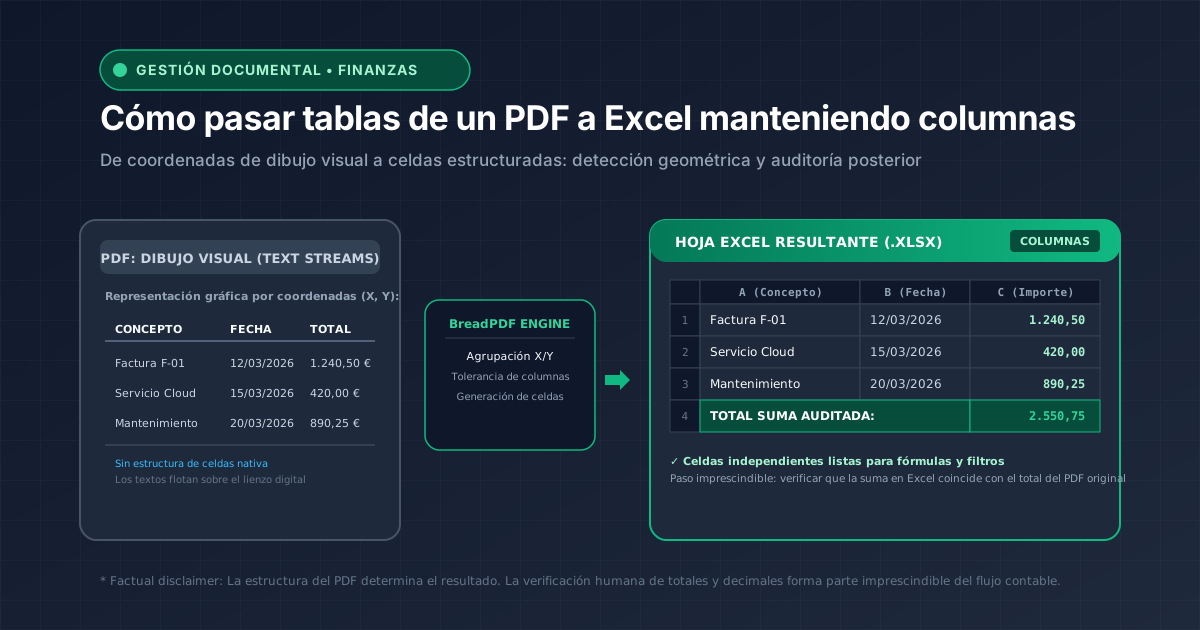

Technical conversion flow from visual PDF table streams to Excel spreadsheet grid
Conversion mechanism: translating absolute coordinate vector text streams (X, Y) into structured spreadsheet cells (.xlsx) with audited totals.
Mascota oficial de BreadPDF
Geometric Data Analysis

Spatial cell reconstruction executed client-side

BreadPDF clusters characters based on horizontal and vertical coordinates to generate clean XLSX workbooks without uploading financial sheets to remote servers.

Why Do PDF Tables Fail to Convert Cleanly into Excel?

To understand conversion obstacles, consider the architecture of the ISO 32000 PDF standard. Unlike an XLSX workbook that organizes content into addressed cells (Row 4, Column C), a PDF is a visual rendering canvas defined by graphic drawing instructions:

GRAPHIC CANVAS

PDF Visual (Coordenades X/Y)

Textos independents col·locats en punts físics del full. No hi ha cel·les ni columnes natives.

DATA MATRIX

Full Excel Estructurat (.XLSX)

Quadrícula relacional de cel·les amb tipus de dada (número, data, text) i fórmules actives.

How to Convert Your PDF Tables into Workbooks

01

Convert PDF to Excel (.xlsx)

The primary workflow for multi-column balance sheets or transaction logs. Clusters character streams to regenerate the grid.

Primary Tool

Convert PDF to Excel with BreadPDF

Generate native XLSX workbooks or CSV exports processing the document directly inside your local browser memory.

Convert PDF to Excel now
02

Extract Structured Key Fields

When targeting discrete fields rather than layouts (totals, dates, tax IDs), the data extractor isolates structured key-value patterns.

03

Two-Stage Pipeline: OCR First, Then Excel

Converting flat scanned images directly produces empty sheets. Run OCR first to build text coordinates before converting to spreadsheet.

Common Mistakes in PDF Table Conversion

Failing to verify column sums with =SUM(): Omitting an arithmetic cross-check of balances before filing financial reports.
Mismatched decimal dots and commas: If Excel evaluates European decimals as thousands groupings, subsequent formulas will miscalculate.

Frequently Asked Questions about PDF Tables & Excel

Can any PDF be converted into Excel?
Not universally or automatically. Digitally generated PDFs with vector text streams permit grouping characters into rows and columns using X/Y coordinates. In contrast, scanned PDFs or photos are pure bitmap images requiring Optical Character Recognition (OCR) first to detect typography.
Why do table columns sometimes appear misaligned in Excel?
Under the PDF specification, tables are not stored as structured spreadsheet grids, but as floating character strings positioned at absolute coordinates. Multiline cell wraps or irregular column gutters can cause the spatial grouping algorithm to misjudge column boundaries.
Can I convert a scanned PDF to Excel?
Yes, using a two-step workflow: first apply OCR to generate a searchable character layer over the scanned image, then convert that extracted text into an Excel workbook.
Do I always need OCR?
No. OCR is only required if the document is a flattened image where text cannot be highlighted with your cursor. If you can select and copy words, it is a native digital PDF and can be converted directly.
Are mathematical formulas preserved in the conversion?
No. PDF files store only the rendered visual output of calculations (e.g., the static total number), never underlying spreadsheet logic ('=SUM(...)'). Exported sheets will contain static values.
Are numeric formats and dates preserved accurately?
This depends heavily on regional locale settings. European documents often employ commas as decimal separators and periods for thousands, whereas US/UK systems use the inverse. You must verify that your spreadsheet application parsed numbers as numeric values rather than raw text.
How can I verify that the data converted accurately?
The standard administrative audit technique is to insert a `=SUM()` formula over the imported amount column and verify that the calculated balance matches the printed total on the original PDF down to the cent.
What should I do if Excel fails to align columns cleanly?
If the XLSX output shows shifted cells due to complex nesting, export in CSV format and use Excel's 'Get Data > From Text/CSV' wizard to manually adjust column widths and delimiter rules.

Financial Data Privacy & Technical Verification

At BreadPDF, the Excel converter, data extractor, and OCR engine execute entirely in client browser memory via WebAssembly without cloud data transmissions.