
How to Hide Personal Data in a PDF Before Sharing It
Sharing contracts, payroll records, or reports in PDF format poses significant privacy risks without inspecting both visible content and hidden file structures. Learn how to redact visuals, strip metadata, and sanitize automated scripts.
Redacting elements or clearing metadata are practical safeguards. No software tool can 'automatically anonymize' or independently guarantee GDPR compliance. Compliance requires contextual governance under the data controller.
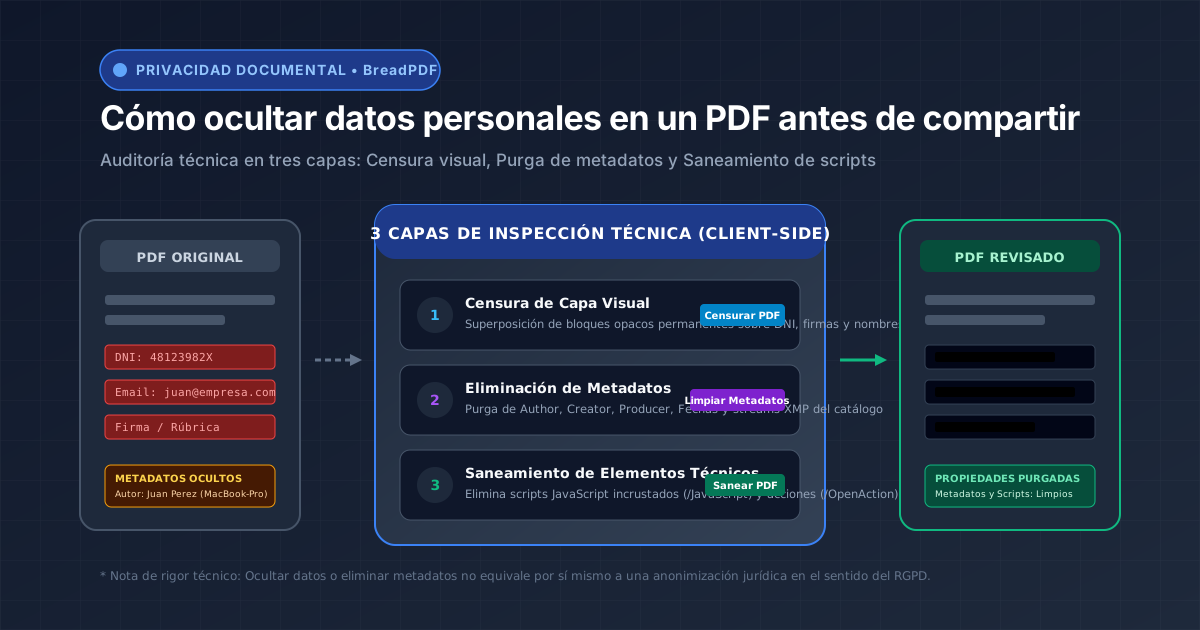
Permanent redaction and structural purge running 100% client-side
Your confidential files, tax numbers, and payroll data never cross the internet. Vector coordinate overwriting runs inside your local browser memory.
What You Should Inspect Before Sharing a PDF
Under Article 4(1) of the GDPR, personal data encompasses any information relating to an identified or identifiable natural person. Inspect critical elements:
Step-by-Step 4-Stage Sanitization Workflow
Step 1: Identify Information That Must Be Hidden
Prepare an inventory of specific values (surnames, national ID numbers, personal emails) that must not appear in the draft.
Redact PDF with BreadPDF
Render solid opaque masking blocks over every match. BreadPDF permanently excises underlying vector character streams.
Remove PDF Metadata
Clear standard authoring fields and strip embedded XML/XMP metadata streams completely.
Step 4: Sanitize Specific Technical Elements
Neutralize embedded JavaScript routines and launch triggers (/OpenAction) from the document catalog.