
How to Make a Scanned PDF Searchable with OCR
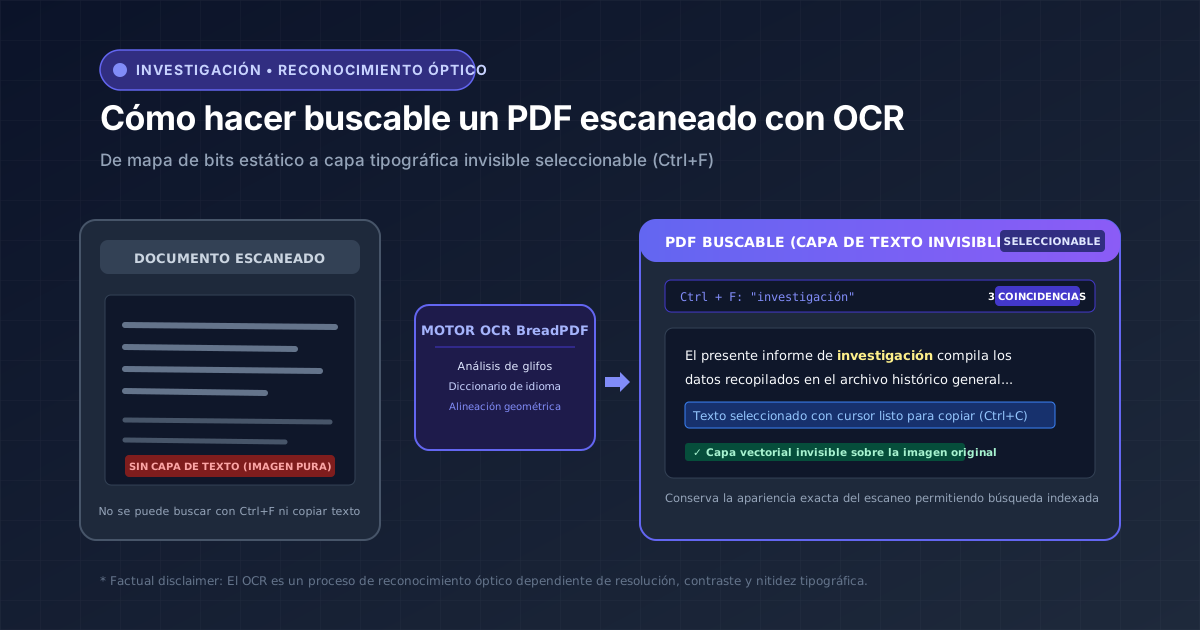
If a scanned PDF stores pages as flattened images, highlighting text or searching with Ctrl+F is impossible. OCR technology analyzes glyph forms to embed an invisible vector text layer for keyword lookups and citations.
No OCR system delivers 100% precision across damaged or low-contrast materials. Accuracy depends on scanning DPI, contrast, tilt, and typography. Ocular verification of critical figures remains mandatory.
Precise optical character recognition processed client-side
Our client-side vision engine processes glyphs locally using WebAssembly. Your documents never transit to third-party cloud servers, preserving total confidentiality.
How to Tell If Your PDF Needs OCR
A document can appear completely legible on your screen while remaining invisible to search engines or reference managers. Run these 3 quick diagnostics:
Type a word clearly visible on the page. If the search returns '0 results', the file lacks an embedded digital text layer.
Click and drag across a sentence. If you cannot highlight characters and instead drag an image outline, the page is a bitmap.
Press Ctrl+C and paste into Notepad. If nothing pastes or unreadable gibberish appears, OCR processing is required.
What Does OCR Actually Do?
Optical recognition does not magically redraw the page or reconstruct your document from scratch. It follows a structured computer vision sequence:
Imatge escanejada
Matriu de píxels en escala de grisos o color.
Anàlisi de glifs
Detecció de formes, línies i separació de paraules.
Capa invisible
Generació de caràcters transparents sobre coordenades exactes.
Document cercable
Ctrl+F actiu, selecció tipogràfica i còpia.
Step-by-Step Guide to Making a PDF Searchable
Step 1: Clean and Prepare Document Pages
OCR algorithms parse text horizontally. If a page was scanned sideways (rotated 90° or 180°), glyph detection will fail. Eliminating blank separator sheets beforehand accelerates processing:
Run PDF OCR with BreadPDF
Select the primary source language to activate morphological dictionaries and export a clean searchable PDF.
Step 3: Audit Recognized Output with Quality Checklist
Technical Limitations: Tabular Data & Cursive Handwriting
Tables & Financial Grids
OCR identifies glyphs but does not infer mathematical relationships between cells. To edit numbers, run OCR first and then pass the document to PDF to Excel.
Cursive & Handwritten Text
Standard OCR models are trained on typeset fonts and printed typography. Freehand handwriting, cursive letters, and signatures exhibit high discrepancy rates.
Practical Scenarios & Workflows
| Document Type | Recommended Sequence | Primary Objective |
|---|---|---|
| Llibre o article d'arxiu escanejat | Rotar PDF → OCR de PDF | Cerca amb Ctrl+F i citació bibliogràfica indexable. |
| Apunts de classe impresos | OCR de PDF → Extraer texto (.txt) | Copiar resums a Word o processadors d'apunts. |
| Factura o balanç en paper escanejat | OCR de PDF → PDF a Excel | Estructurar columnes i auditar xifres amb sumes. |
| Expedient jurídic o administratiu | OCR de PDF + Comprovació ocular | Localitzar antecedents i números de procediment. |