
How to Convert a PDF to Editable Word (and What Is Preserved)
Converting a PDF to Word is not about copying the document's appearance, but recovering its text so you can edit it again. This guide explains what the BreadPDF converter extracts, how reading order is preserved, and when you need an earlier step before converting.
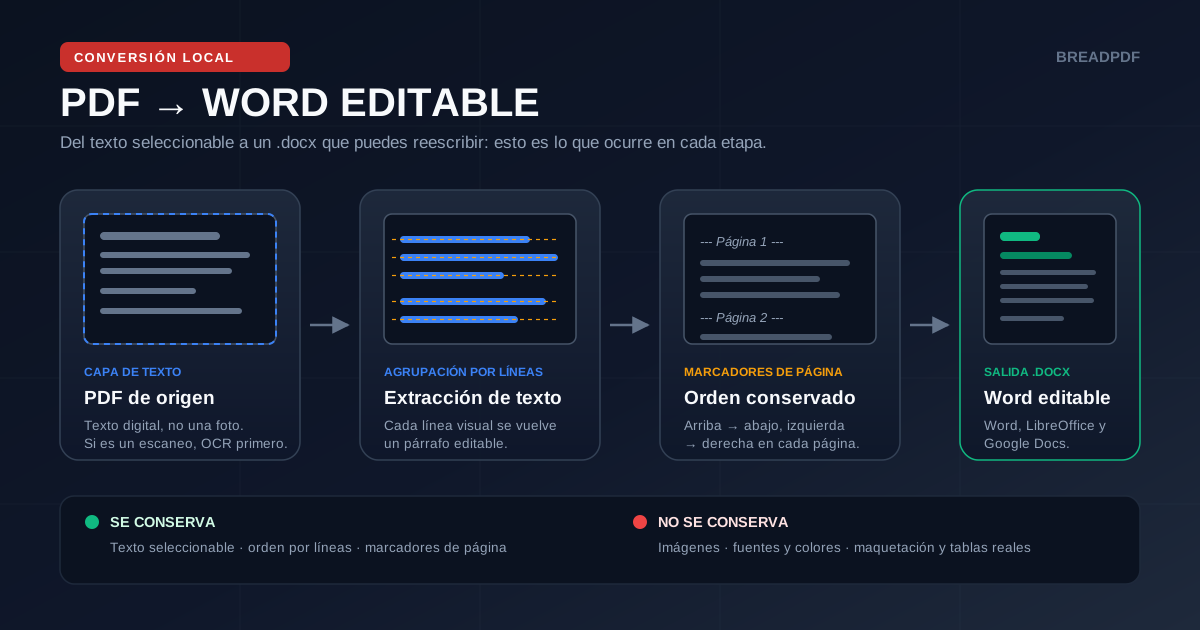
What the Converter Keeps and What It Does Not
Before converting, it helps to know exactly what you will get. The table describes the tool's actual behaviour, not a promise of perfect fidelity:
| PDF element | In the .docx | What actually happens |
|---|---|---|
| Selectable text | Yes | Each visual line becomes an editable paragraph. |
| Images and logos | No | They are not extracted; insert them again manually in Word. |
| Fonts, sizes, colors | No | All text comes out in a uniform 12-point base style. |
| Tables | Partial | Content arrives as text; cells are not rebuilt. |
| Columns | Partial | Lines are ordered by vertical position; two-column layouts may interleave. |
| Page breaks | Marker | '--- Página N ---' is inserted as a paragraph, not a real page break. |
How to Convert the PDF to Word in Three Steps
Select the digital PDF
Convert and watch page progress
Download the .docx and review it
Convert your PDF to editable Word
Extract text line by line, separate pages with markers, and generate a .docx compatible with Word, LibreOffice, and Google Docs.
When You Need an Earlier Step
The converter cannot invent text the PDF does not contain or rebuild structures that do not exist as such. These three cases need a different tool before or instead of conversion:
Reviewing the .docx Before Sending It On
Conversion is the first step, not the last. This checklist prevents the most common mistakes when reusing a converted document:
- Check reading order on pages with columns, tables, or repeated footers.
- Search for '--- Página' and delete the markers if the final document does not need them.
- Reapply headings, bold text, and lists using real Word styles to keep a coherent hierarchy.
- Reinsert images, charts, and tables, then confirm that in-text references still point to the right place.
- Export back to PDF if the recipient only accepts PDF, and confirm the text is still selectable.
Do not use this workflow to rebuild invoices, contracts, or legally relevant documents when the original formatting must be preserved exactly. In those cases the signed original PDF or PDF/A is the reference, not the converted .docx.